Latest News

Search This Blog

Showing posts with label Apple. Show all posts

How To Play Pokemon Go On Your Computer?


Pokemon Go has earned its place as one of the most viral mobile applications of all time. It has already surpassed Tinder and Twitter in terms of downloads and daily users. According to the latest data, people are spending more time playing Pokemon Go as compared to Facebook.

This location-based augmented reality game is being played by millions of people all across America. Nintendo is working to expand its availability in other regions and bring along more people to this Pokemon-party.

To play the game, you need to walk around and catch Pokemons. For this purpose, the game uses your smartphone’s GPS. So, if you are thinking of using an Android emulator like BlueStacks to play this game on your PC, you need to do something more.


Things to Download

Bluestacks:
http://www.bluestacks.com/download.html

Kingroot: (Download for Android)
https://kingroot.net/

Lucky Patcher:
http://www.luckypatchers.com/download/

GPS Spoofer:
http://www.mediafire.com/download/5i7...

Pokémon GO: (Download latest version)
http://www.apkmirror.com/apk/niantic-...


Step by step tutorial (if only want to spoof, start at step 2):

1. Clean install Bluestacks.1b. Disable camera by going into REGEDIT on your computer and going to "HKEY_LOCAL_MACHINE\SOFTWARE\BlueStacks\Guests\Android\Config". Press camera and change the '1' to a '0', save and you're done.2. Install and run Kingroot and wait untill fully rooted.3. Restart the Android Plugin by clicking the gear wheel and press restart.4. Download GPS Spoofer, but do not install it yet.5. Install Lucky Patcher, allow it root acces and press "Rebuild & Install".6. Press "sdcard", "windows" and then find the GPS Spoofer apk file (I put it in "Documents").7. Press "Install" and let it install as a system file.8. Restart the Android Plugin by clicking the gear wheel and press restart.9. Open GPS Spoofer and uncheck everything, but check "Expert Mode".10. Choose a location in GPS Spoofer and spress the start button.11. Open Pokémon GO, log in and play! (If you want to move, select a new location in the GPS Spoofer app)


COMMON ERRORS:


"Failed to detect location." (if this doesn't work, then do the teleportation fix)
Change the GPS to High Accuracy, move your location on GPS Spoofer and restart Pokémon GO.

"Pokéstops not working/Pokémon fleeing after 1 Pokéball?"
You probably travelled to fast and got soft-banned, don't worry, it only lasts around one hour.

"My player keeps teleporting between locations."
Install an app from the Play Store called "DisableService" and allow root (obviously), search for the service "Fused Location" under System tab and disable that service. Then reboot. Doing this trick will disable your real GPS and then no teleporting will be happening. If you want your real GPS back, just enable "Fused Location" again and reboot.

"When I try to disable AR, everything freezes/crashes."
Disable camera by going into REGEDIT on your computer and going to "HKEY_LOCAL_MACHINE\SOFTWARE\BlueStacks\Guests\Android\Config". Press camera and change the '1' to a '0', save and you're done.
OR
Download this: https://play.google.com/store/apps/de...

"When I start Pokémon Go, I get a grey screen."
Either close Bluestacks entirely and relaunch Bluestacks or uninstall Bluestacks and redo the tutorial with Bluestacks for Windows 7/8.

"When I throw a Pokéball, the game crashes."
Delete your Google account from settings and restart Pokémon GO.


Note: While this game is free, playing it on PC is against the terms of Pokemon Go–so use this method at your own risk.
Are you enjoying Pokemon Go on your smartphone? Share your experiences with us in the comments section below.


10 Facebook Messenger Tips And Tricks


Facebook Messenger is one of the best ways to chat with your Facebook friends. This app also supports audio and video calls in android phone.


In this guide, we collect some best tricks and tips for you that worked with Facebook Messenger app.


1. Play Chess Game in Facebook Messenger
Type @fbchess play in Conversation chat for playing Chess Game and @fbchess help for help in Facebook Messenger. For example in this screenshot i'm playing chess with my friend Mohammad Saad


2. Send Animal Image in Facebook Messenger
Type @dailycute in conversation chat for sending random animal image in Facebook Messenger. For example in this screenshot i sent the animal image to my friend Hashir Jaral


3. Sync with Additional Apps in Facebook Messenger
Tap on three dots for integrating additional apps in your Facebook Messenger.

||||||||||||||||||||||||||||||||||||||||||||||||||||||||||||||||||||||||||||||||||||||||||||||||||||||||||||||||||||||||||||||||||||||||||||||||||||||||||||||||||||||||||||||||||


4. Log out From Facebook Messenger App
Clear data of your Facebook App in Android Mobile Settings for log out in Facebook Messenger App.

Click Here !


5. Change Conversation Color of a Particular Conversation Chat in Facebook Messenger
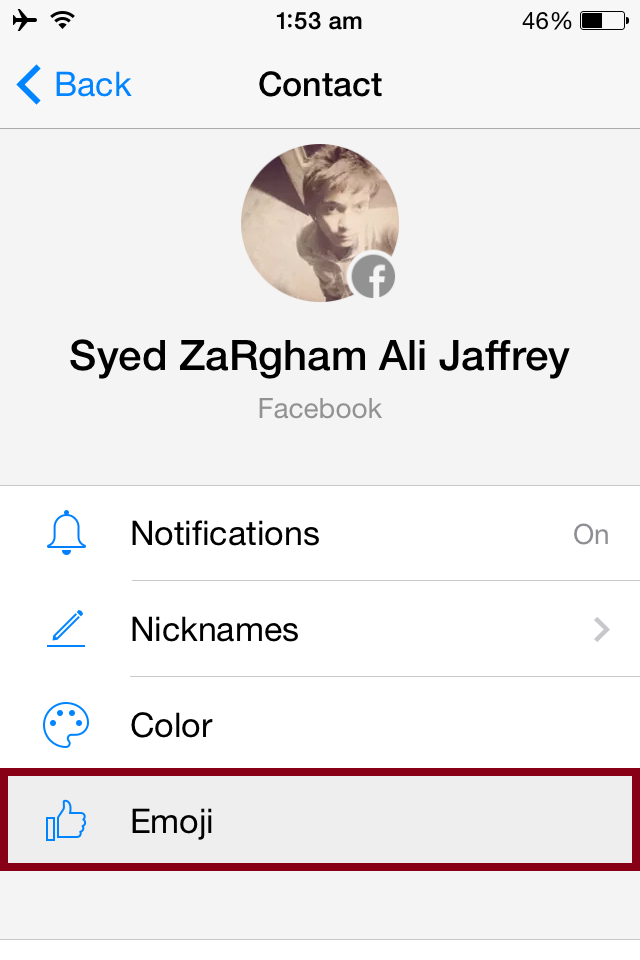
Change Chat Conversation Color in Facebook Messenger from a tap on Color option. Open any of your Friend details in Facebook Messenger and change the chat color. For example i'm changing chat color of my friend Syed Zargham 

 ||||||||||||||||||||||||||||||||||||||||||||||||||||||||||||||||||||||||||||||||||||||||||||||||||||||||||||||||||||||||||||||||||||||||||||||||||||||||||||||||||||||||||||||||||


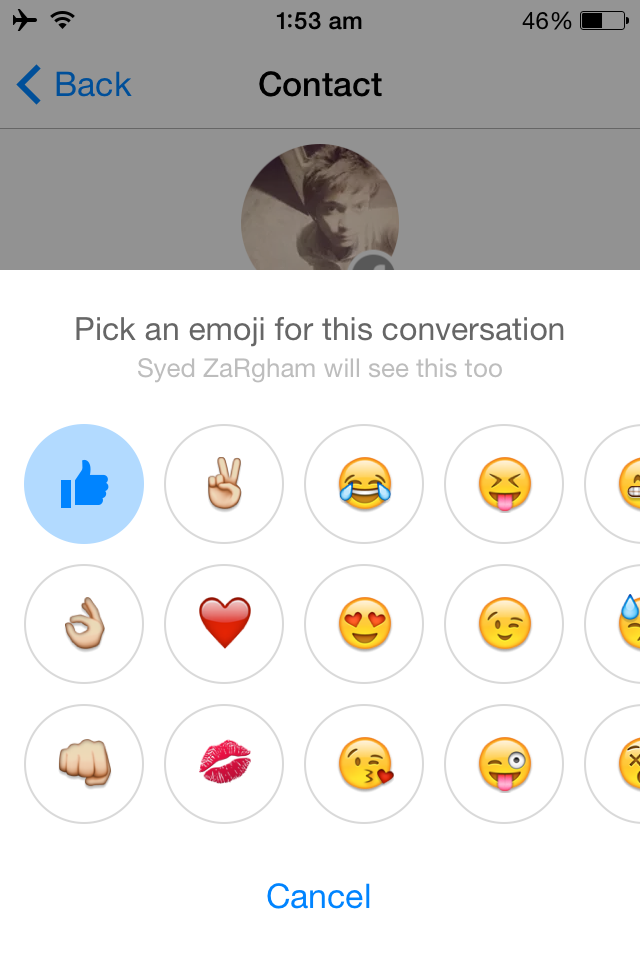
6. Change Emoji in Facebook Messenger
Tap on Emoji button fro changing your default like button emoji to other emoji.
 
||||||||||||||||||||||||||||||||||||||||||||||||||||||||||||||||||||||||||||||||||||||||||||||||||||||||||||||||||||||||||||||||||||||||||||||||||||||||||||||||||||||||||||||||||


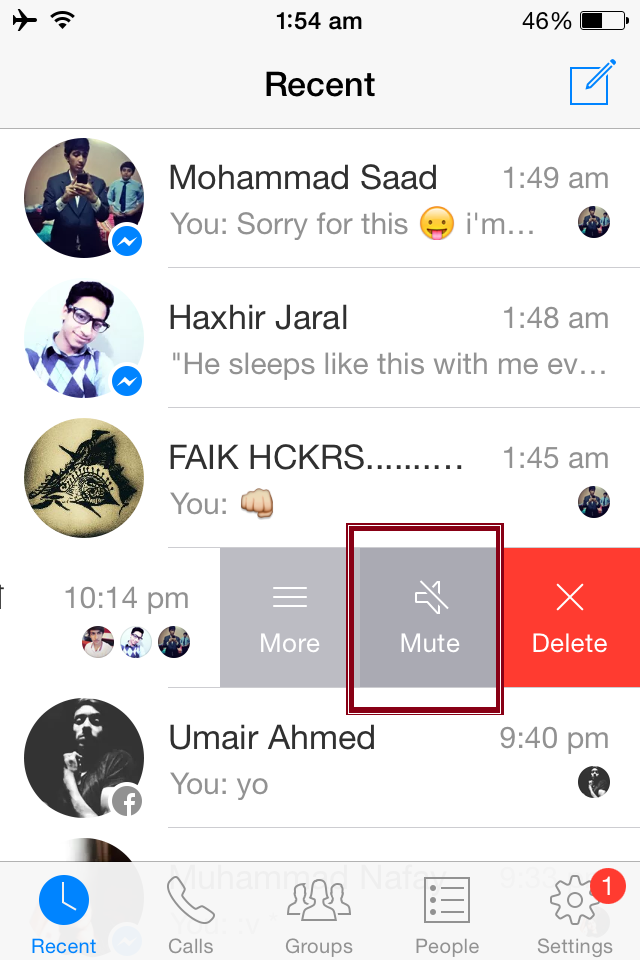
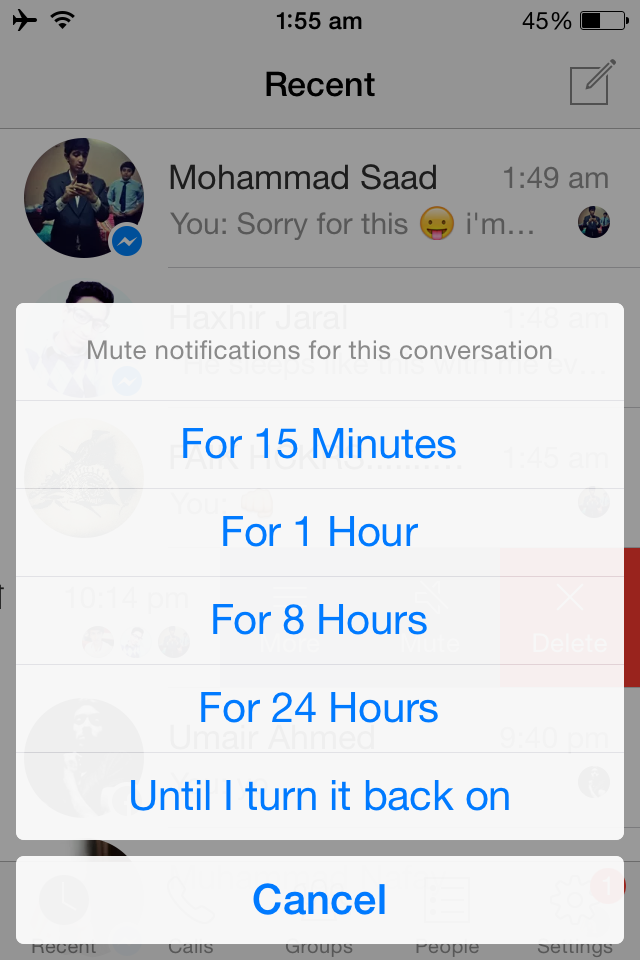
7. Mute Notification For any Conversation
Long press to any Chat in Facebook Messenger app and select mute notifications.

 ||||||||||||||||||||||||||||||||||||||||||||||||||||||||||||||||||||||||||||||||||||||||||||||||||||||||||||||||||||||||||||||||||||||||||||||||||||||||||||||||||||||||||||||||||


8. Delete Conversation in Facebook Messenger
Delete All Conversation in Facebook Messenger from this option.


9. View Hidden Messages Requests in Facebook Messenger
Tap on People in Settings for open Hidden Message Requests in Facebook Messenger.

 ||||||||||||||||||||||||||||||||||||||||||||||||||||||||||||||||||||||||||||||||||||||||||||||||||||||||||||||||||||||||||||||||||||||||||||||||||||||||||||||||||||||||||||||||||


10. Change Nickname in Facebook Messenger
Tap on Nickname button for changing your default name.

  ||||||||||||||||||||||||||||||||||||||||||||||||||||||||||||||||||||||||||||||||||||||||||||||||||||||||||||||||||||||||||||||||||||||||||||||||||||||||||||||||||||||||||||||||||


How to Jailbreak iOS 9 – iOS 9.0.2 using Pangu Jailbreak on Windows and Mac


Pangu iOS 9 Jailbreak


Source : iPhoneHacks

Pangu team just surprised us by releasing Pangu jailbreak for iOS 9 – iOS 9.0.2, the first jailbreak for iOS 9 and also for iPhone 6s, iPhone 6s Plus. Here’s how to jailbreak your device running on iOS 9, iOS 9 or iOS 9.0.2 using Pangu jailbreak.

Windows :-

Some important points before you proceed:
  • This tutorial is for Windows users.
  • Pangu9 jailbreak too can jailbreak iOS 9, iOS 9.0.1, iOS 9.0.2.
  • Pangu supports following iOS 9 – iOS 9.0.2 devices:
    • iPhone 6s, iPhone 6s Plus, iPhone 6, iPhone 6 Plus, iPhone 5s, iPhone 5c, iPhone 5, iPhone 4S
    • iPad Air 2, iPad Air, iPad 4, iPad 3, iPad 2
    • iPad mini 4, iPad mini 3, iPad mini 2, iPad mini
    • iPod touch 6G, iPod touch 5G
  • Pangu9 is an untethered jailbreak.
  • Use iCloud or iTunes to back up any and all personal information that you need to keep safe. The jailbreak has been reported to be working in most cases, but on the off chance something goes wrong, it’s a good idea to have an escape plan.
  • Disable any Anti-virus programs or firewalls that could prevent Pangu from connecting to the internet.
  • If you’re on the fence and not sure if you should jailbreak your device, then check our post on some of the tops reasons to jailbreak iOS 9 – iOS 9.0.2.

How to Jailbreak iPhone, iPad and iPod touch on iOS 9 – iOS 9.0.2 using Pangu Jailbreak (Windows)

Follow these steps to jailbreak your iPhone, iPad and iPod touch on iOS 9 – iOS 9.0.2 using Pangu jailbreak.
Step 1: Download the latest version of the Pangu jailbreak from here.
Pangu 9 1.2.0
Step 2: Connect your device to your computer using the USB cable.
Step 3: Enable Airplane mode, Disable Passcode from Settings > Touch ID & Passcode and turn off Find my iPhone from Settings > iCloud > Find my iPhone.
Step 4: Please launch the application as an Administrator. Right Click on the Pangu exe and select the “Run as Administrator” option.
Step 5: Pangu will take some time to detect your device. Once that is done, click on the blue Start button.


Pangu iOS 9 Jailbreak - Start


Step 6: Click on Already Backup to proceed to the jailbreak.


Pangu iOS 9 Jailbreak - Already Backup

Step 7: It will install the Pangu app with the WWDC app (Interesting!) on your iPhone, iPad or iPod touch.
Step 8: It will reboot your device, and prompt you to enable AirPlane mode again after your device has rebooted.
Step 9: At 75%, it will then prompt you to unlock your device, and run the Pangu app. Launch the Pangu app from the Home screen.


Pangu iOS 9 Jailbreak - Run Pangu app


Step 10: Next, it will prompt you to tap on the Accept button, to give access to the Photos app. Tap on Allow when you get a prompt on your iPhone. It is not clear why it needs access to the Photos app, we’ll update the post when we get more information.


Pangu iOS 9 Jailbreak - Access Photos

Step 11: Wait for the progress bar to complete. Your iPhone or iPad will reboot.
Step 12: Once the process completes, the Pangu tool will tell you that your device is “Already Jailbroken”. You should see the Cydia icon on your home screen.


iPhone - iOS 9 Jailbreak

You can check out the video tutorial on how to jailbreak iOS 9 – iOS 9.0.2 using Pangu Jailbreak:


Mac:-

Pangu team released an untethered jailbreak for iOS 9 – iOS 9.0.2, but the jailbreak tool is Windows only. Pangu team haven’t said when they will be releasing the Mac version of their jailbreak tool.
If you can’t wait, and don’t have access to a Windows machine, then we’ve got you covered. Here’s how to jailbreak your iPhone, iPad or iPod touch running iOS 9 – iOS 9.0.2 using Pangu Jailbreak on Mac OS X using a virtual machine.

How to run Windows on your Mac using Parallels

We’ll be using Parallels, a virtualization software, to boot Windows in a virtual machine.
  • Download and install Parallels Desktop for Mac from this link. While the software is paid, you get a free 14-day trial.
  • Download Windows 8.1 Enterprise evaluation 90 day trial for free from this link. You’ll be downloading an ISO file, which might take some time, depending on your connection.
  • Open Parallels, select File > New from the menu, and click on “Install Windows from DVD or Image File”.
  • Parallels will take you through the install process.

How to run Windows on your Mac using VirtualBox

You can also use VirtualBox to run Windows on your Mac. You can check our guide for step-by-step instructions.

How to Jailbreak iOS 9 – iOS 9.0.2 on your iPhone, iPad or iPod touch

  • After iTunes is installed, follow our step-by-step guide on how to jailbreak iOS 9 – 9.0.2 using Pangu Jailbreak for Windows to complete the jailbreak process.
  • Alternatively, follow the instructions in the video below:


Let us know how it goes in the comments below.

How to Log Out of Facebook Messenger (iOS / Android)

Ever since Facebook decided to force people to use Facebook Messenger to send and receive messages through Facebook, many people are not happy. If you’ve decided to install it and log in, you probably discovered that there’s no way to log out.
Facebook Messenger may be the easiest way to stay in contact with your friends on Facebook, but you may not want it active all the time. Unfortunately, there is no log out button or option on the interface like there is on Facebook. However, there is a way to log out of the app when you’re not using it.


1) Open Messenger app.

 2) Now, you're logged in.
Click on home button (iOS)
Close the Messenger app (Android)

 3) Open Facebook app.

 4) Click on "MORE".

 5) Scroll down.

 6) Click on "SETTINGS".

 7) Click on "ACCOUNT SETTINGS".

 8) Go to "SECURITY".

 9) Click on "ACTIVE SESSIONS".

 10) Click on "X" mark to remove Messenger Session.

 11) Click on "MORE".

 12) Scroll down and
i) LOG OUT.
ii) Double tap on Home button (iOS)
Open Task Manager (Android)

 13) Slide up Messenger and Facebook apps (iOS)
End Task of Messenger and Facebook apps (Android)

 14) Tap on Home button to go on Home Screen.

 14) Open Messenger again.

 15) You i'll now receive a message "Session Expired".

 16) Congratulations! you've logged out now.

Cydia iOS 7 Top Repo Sources


Adding a New Repo to Cydia:-

  1. Open Cydia from your home screen
  2. Tap Sources
  3. Tap Edit
  4. Tap Add 
  5. Type in the correct URL – given with the source below
  6. Tap on Add Source and Cydia will install the repository for you.add cydia repo

Top iOS 7 and upcoming iOS 8 Cydia Sources

  • BigBoss – URL –
The largest source of al and included as a default repository with Cydia
  • ModMyi – URL – http://apt.modmyi.com/
The next largest source, also a default repository in Cydia
  • Intelliborn – URL – http://intelliborn.com/cydiav
intelliborn repo
This one houses some extremely popular tweaks such as MyWi, IntelliID, My3G andIntelliscreenX. It also one of the few repositories that is regularly updated.
  • Insanelyi – URL – http://repo.insanelyi.com
insanelyi repo ios 8
A highly popular source, contains a mix of pirate and genuine apps. It has more than 7000 different apps, tweaks and themes to choose from.
  • BiteYourApple – URL – http://repo.biteyourapple.net
biteyourapple
Another popular choice of repository has a large number of different ringtones, tweaks and mods in it, many of which have no beneficial use but are a lot of fun to use and look at.
  • iSpazio – URL – http://repo.ispazio.net
ispazio
This source used to be full of cracked apps but has since cleaned its act up and is now a popular repository with a wide range of apps, themes and tweaks to choose from.
  • ThemeItApp – URL – http://www.themeitapp.com/repo/
This source is home to ThemeIt, a highly successful app that allows a user to modify the look of their iOS device. It only has three packages in it but all of them are worth a look.
  • Rpetri.ch – URL – http://rpetri.ch/repo/
If you have heard of popular tweaks such as BrowserChooser, Auxo or Chrome, this is the place to get them from. It is another one that is regularly updated and new stuff is being added on a regular basis.
  • HackYouriPhone – URL – http://repo.hackyouriphone.org
hack your iphone
This one does contain a large number of cracked apps but, if you wade through it all, you will find some very nice genuine ones as well.
  • SinfuliPhoneRepo – URL – http://www.sinfuliphonerepo.com
sinfuliphone repo ios 8
Another popular repository where you will find AppSync and a number of other very popular tweaks. It does have a lot of pirate content but there are some genuine ones in amongst them.
  • Xsellize – URL – http://cydia.xsellize.com
xsellize repo ios 8
Another repository full of pirate apps but also a very popular stopping off place for those who want ROM packages for those who makes use of emulators.
  • iHacks –URL – http://ihacksrepo.com
Yet another source with a mix of pirate content and genuine apps, including a number that extend the functionality of existing apps and tweaks.
  • iCause FX – URL – http://repo.icausefx.com/
Home to a lot of modification and customization tweaks, well worth a root through.
  • iHackstore – URL – http://ihackstore.com/repo
ihackstore repo ios 8
This one contains a large number of the most popular apps and tweaks, all of which can be found in other repositories on Cydia.
  • iF0rce – URL – http://apt.if0rce.com
This source has very few tweaks in it but the few it has are worth a look. Here you will find AirBlue GPS and AirBlue Sharing.

Source : JailbreakModo

tags : Jailbreak , Cydia , iPhone , iPad , iOS , iOS 7 , Repo , Cydia Sources , How to add repos / sources , BigBoss , ModMyi , Intelliborn , Insanelyi , BiteYourApple , iSpazio , ThemeItApp , Rpetri.ch , HackYouriPhone , SinfuliPhoneRepo , XSellize , iHacks , iCause FX , iHackStore , iF0rce